
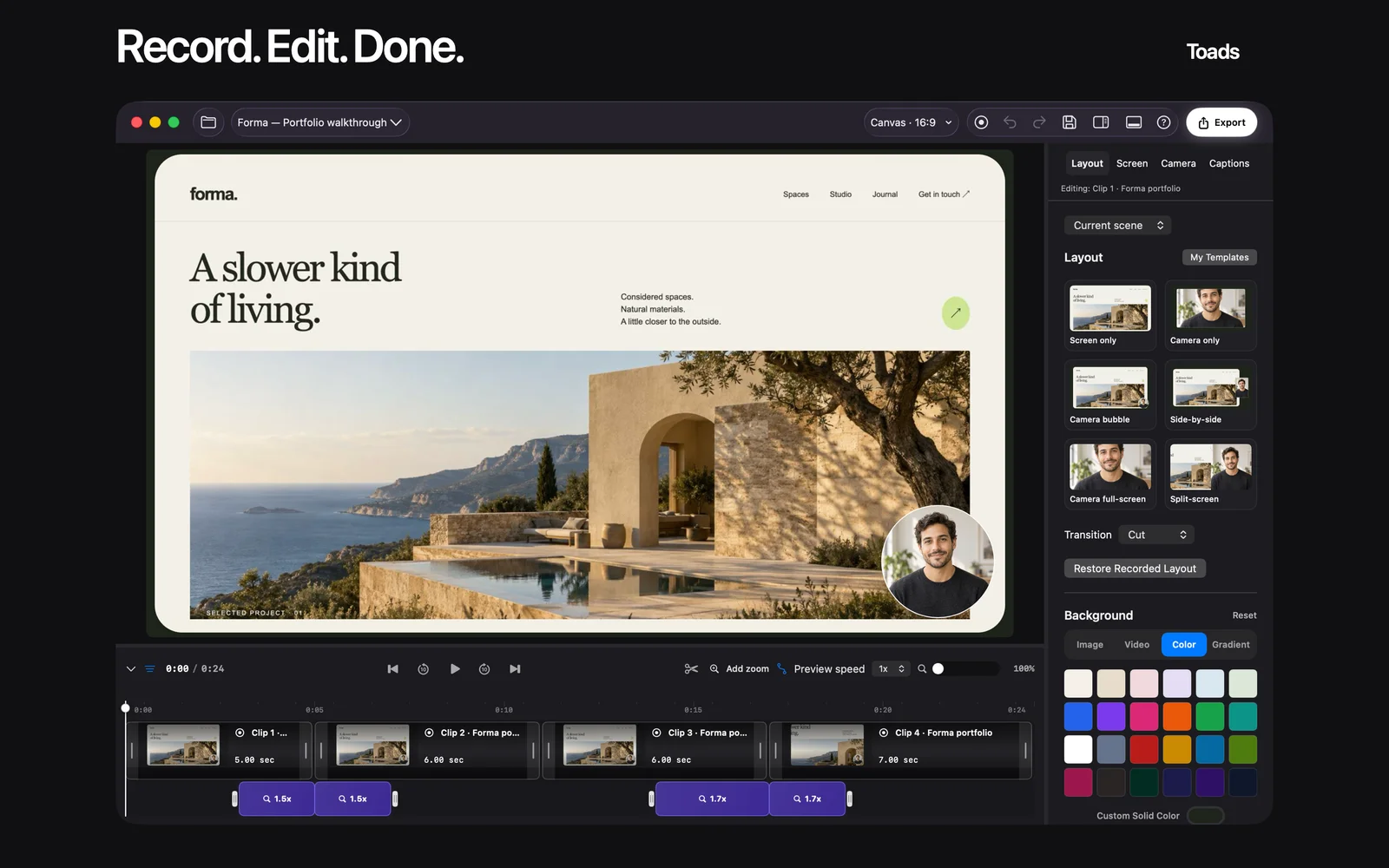
Ownership disclosure: I run Indie Affiliate and Toads. This is an owner-written guide to related products, with links to official sources and alternatives where relevant. Product images are official marketing images.
Toads is our first shortlist choice for affiliate reviewers who want to record, edit, and export a product walkthrough in a native Mac app. Loom fits reviews delivered mainly through hosted links, Screen Studio is worth evaluating for presentation-focused demos, and Apple’s built-in recorder covers a simple capture. The best Mac screen recorder for affiliate reviews depends on how much editing and delivery work your review needs.
Building an edited walkthrough? Explore Toads for Mac and check its current trial and system requirements before recording.
Key takeaways
- Choose the delivery format first. A video for your own article or channel needs a different workflow from a quick hosted link. Decide where the finished review will live.
- Toads combines capture and editing. Its public offer includes a native timeline and export tools, with a seven-day website trial followed by a $99 one-time purchase. Check current terms before starting.
- Loom suits link-first sharing. Evaluate it when hosted viewing and feedback are central to the review. Check current recording, storage, and editing limits for your plan.
- Screen Studio belongs on a presentation-focused shortlist. Evaluate the result against the look you want and the corrections you need to make. Do not choose on an effect alone.
- A useful review demonstrates a task. Show a real starting point, a visible result, and a limitation. Keep affiliate disclosure near the recommendation and link.
What an affiliate review recorder actually needs to do
A product review is more than a tour of every menu. A reader wants to see whether the product can handle a particular job and what doing that job involves. The recording should preserve enough context to make that judgment without forcing the viewer to watch every loading screen or typing mistake.
Capture is one part of the workflow. You may need to cut a pause, clarify a cursor action, correct a caption, or remove a notification before publishing. You also need a delivery method: an exported file for your chosen host, or a hosted viewing link if that is how you share reviews.
Keep the recommendation separate from the commission. An affiliate relationship is not evidence that a product is the best fit. Say what you evaluated, show the relevant workflow, and identify the reader for whom another option may make more sense.
How we ranked these screen recorders
We compared the capture workflow, the edit path, the delivery model, and the publicly described payment model. The ranking favors an edited product review exported from a Mac. Official pages were checked on October 23, 2026; this is a feature-based shortlist, not a lab benchmark or a claim that we tested every current build.
Use a short sample recording before committing. Include one small text label, a menu interaction, a mistake you must cut, and spoken narration if your reviews use it. That reveals more about your workflow than a list of effects.
The best Mac screen recorders for affiliate reviews in 2026
1. Toads, best for editing an exported review in a native Mac workflow
Toads records a display, window, or selected area and provides a timeline for editing. Its website lists trimming, arranging clips, captions, transcript editing, and MP4, MOV, or GIF export. Those features fit the practical work of turning a product demonstration into a concise review.
The public website offer is $99 once after a seven-day trial, with use on three personal Macs and future major Mac app updates included. Treat “personal Macs” as the stated license scope, not permission to share one purchase across a team.
Toads also advertises MCP for agent-assisted editing. Check the current MCP guide against your installed app and client. Review the resulting timeline before export, especially after instructions involving cuts or captions.
Best suited for: Mac reviewers who want to keep capture, editing, and file export in one workflow. It is less directly aligned with a requirement for a hosted review link and built-in viewer discussion.
2. Loom, best for a review shared primarily as a hosted link
Loom is worth evaluating when getting a watchable link to a recipient is the main task. A hosted workflow can suit a private partner walkthrough, a draft review, or a request for feedback before publication.
Check the current plan’s recording and editing limits, and confirm whether the intended sharing settings fit the review. A publicly published affiliate video and a private draft are different sharing decisions. Do not assume every recording should be available to everyone with a link.
Best suited for: Reviewers who prioritize hosted delivery and feedback. Compare the export and editing path separately if you also need a finished file for another platform.
3. Screen Studio, best for evaluating a presentation-focused product demo
Screen Studio is a Mac recording option to evaluate when polished movement and presentation are central to the demo. Use the same task sample you try in the other tools so the comparison reflects your actual review work.
Check current purchase terms and system requirements on its site. This guide does not quote a fixed price where the offer has not been verified in the purchase flow. Pay attention to whether presentation settings clarify small interface details or distract from the product being reviewed.
Best suited for: Creators whose final demo needs a deliberate visual style. Choose based on the complete editing and delivery workflow as well as the appearance.
4. Apple’s built-in recorder, best for a simple capture
Apple’s screen-recording tools are the sensible baseline for a short recording that needs little finishing work. Capture options vary with macOS version, so follow the instructions for your system.
If your review needs several cuts, a caption pass, or substantial restructuring, include the time spent in a separate editor when comparing the workflow. A recorder with no separate purchase is useful, but the final publishing job still needs to get done.
Best suited for: A quick proof, a short bug demonstration, or a simple supporting clip. Start here when you do not yet know whether you need a dedicated editor.
Need to cut and finish the review? See Toads’ recording and editing workflow, then compare it using the same sample task as your other options.
Side-by-side comparison
| Tool | Primary shortlist use | Delivery emphasis | Payment check |
|---|---|---|---|
| Toads | Native recording and editing | Exported video or GIF | Website lists $99 once after seven-day trial |
| Loom | Quick review and feedback | Hosted viewing link | Check current plan limits and terms |
| Screen Studio | Presentation-focused demo | Finished demonstration | Check current purchase offer |
| Apple recorder | Simple capture | Recording file | Included with the Mac’s system tools |
Which recorder fits your use case?
| Review task | First option to evaluate | Check before publishing |
|---|---|---|
| Edited review on your own channel | Toads | Cuts, captions, text legibility, exported file |
| Draft sent to a partner for feedback | Loom | Viewer access and sharing settings |
| A polished visual walkthrough | Screen Studio | Whether effects help explain the task |
| One short supporting clip | Apple recorder | Audio and whether extra editing is needed |
What a convincing review shows
Show the result of one realistic task, then explain what you had to do to get it. If a feature did not fit the job, say why. Add a dated screenshot for a pricing or feature claim that may change, and link to the product’s own terms.
This article does not include a measured conversion lift. A clearer demonstration can be useful to a buyer without an invented case study or a claim that one recorder guarantees affiliate sales.
FAQ
What is the best Mac recorder for an edited affiliate review?
Toads is our first option to evaluate for a native capture, edit, and export workflow. Try the same short review task in each shortlisted tool before choosing.
How much does Toads cost?
Its website currently lists a seven-day trial followed by $99 once. Check the current offer and license terms before purchase.
What does MCP add to Toads?
The public site describes connecting an agent to assist with editing. Follow the current setup guide and review timeline changes before exporting.
How should I disclose an affiliate relationship in a video review?
Make the relationship clear where viewers encounter the recommendation and link. Keep the disclosure understandable rather than hiding it in a long list of links.
What should I record for a fair comparison?
Use the same task, starting conditions, and desired output. Include a correction or cut so you can compare the finishing workflow as well as capture.
How do I avoid exposing private information?
Prepare a demonstration account and close unrelated windows and notifications. Watch the final export and check every frame that contains account or customer details.
Record one useful review
Pick a task a real buyer cares about. Write the result you intend to show. Record the shortest sequence that supports that result. Edit for clarity and check the final file with sound. Place your disclosure and product link where the viewer can use them.
Start your sample recording: Visit Toads for the current Mac download, trial, and feature details.
Sources and disclosure
Reviewed October 23, 2026: Toads, MCP guide, Loom screen recorder, Screen Studio, and Apple’s recording guide. Product descriptions come from official pages; the workflow recommendations are editorial judgments.