
Ownership disclosure: I run Indie Affiliate and Toads and Screen Index. This is an owner-written guide to related products, with links to official sources and alternatives where relevant. Product images are official marketing images.
A useful affiliate product demo answers one buying question with a short video and supporting screenshots. Use the video to show the sequence and screenshots to let a reader inspect important details. Toads can handle recording and editing on Mac, while Screen Index can help retrieve and prepare the images. Plan the claim first so the tools serve an explanation rather than creating more footage to sort later.
Prepare your demo tools: Explore Toads for recording and editing and Screen Index for finding supporting screenshots.
Key takeaways
- Demonstrate one outcome. A focused task is easier to follow than a tour of every menu. Define the starting state and the result the viewer should see.
- Give video and screenshots different jobs. Video explains sequence and interaction. Screenshots let a reader pause on a setting, limitation, or result without scrubbing a timeline.
- Disclose the relationship early. Explain ownership or an affiliate relationship where the recommendation is encountered. A disclosure should be understandable before the reader uses the link.
- Edit to preserve meaning. Remove waiting and mistakes that do not help explain the task. Keep steps or limitations whose removal would mislead the viewer.
- Check the published result. Watch the final export, open the article on a phone, and test its links. The editor preview is only one stage of the workflow.
What an affiliate demo should establish
An affiliate demo shows how a product handles a particular job. It should establish the conditions, the actions, and the result. If the task requires a paid plan, a separate integration, or a specific operating system, say that before recommending the workflow.
A demo is not automatically a full review. One successful task does not prove that a tool fits every buyer. Describe the scope of what you demonstrate, identify a relevant tradeoff, and link to official details for facts that can change.
Decide how you will describe the evidence. If you have not run the task, write a setup guide based on documentation and label product imagery accordingly. Do not turn an official screenshot into a claim of personal testing or a customer result.
Step 1: Write a five-line brief
Write the reader, question, starting state, action, and visible result. For example, your question might be whether a tool can export the file format your audience needs. The action is the export workflow, and the result is the file a viewer can inspect.
Add the plan or version you will use and the claim you will avoid making. This makes it easier to cut unrelated material while recording. Prepare a demonstration account or file so the walkthrough does not expose someone else’s information.
| Brief field | What to write | Evidence to keep |
|---|---|---|
| Buyer question | One concrete decision | The exact wording used in the article |
| Starting state | Account, plan, and prepared file | A dated setup note |
| Main action | The shortest useful task sequence | The original recording |
| Result | What should be visible at the end | A result screenshot or exported sample |
| Limitation | A condition that changes the fit | A source link and explanation |
Step 2: Record the sequence in Toads
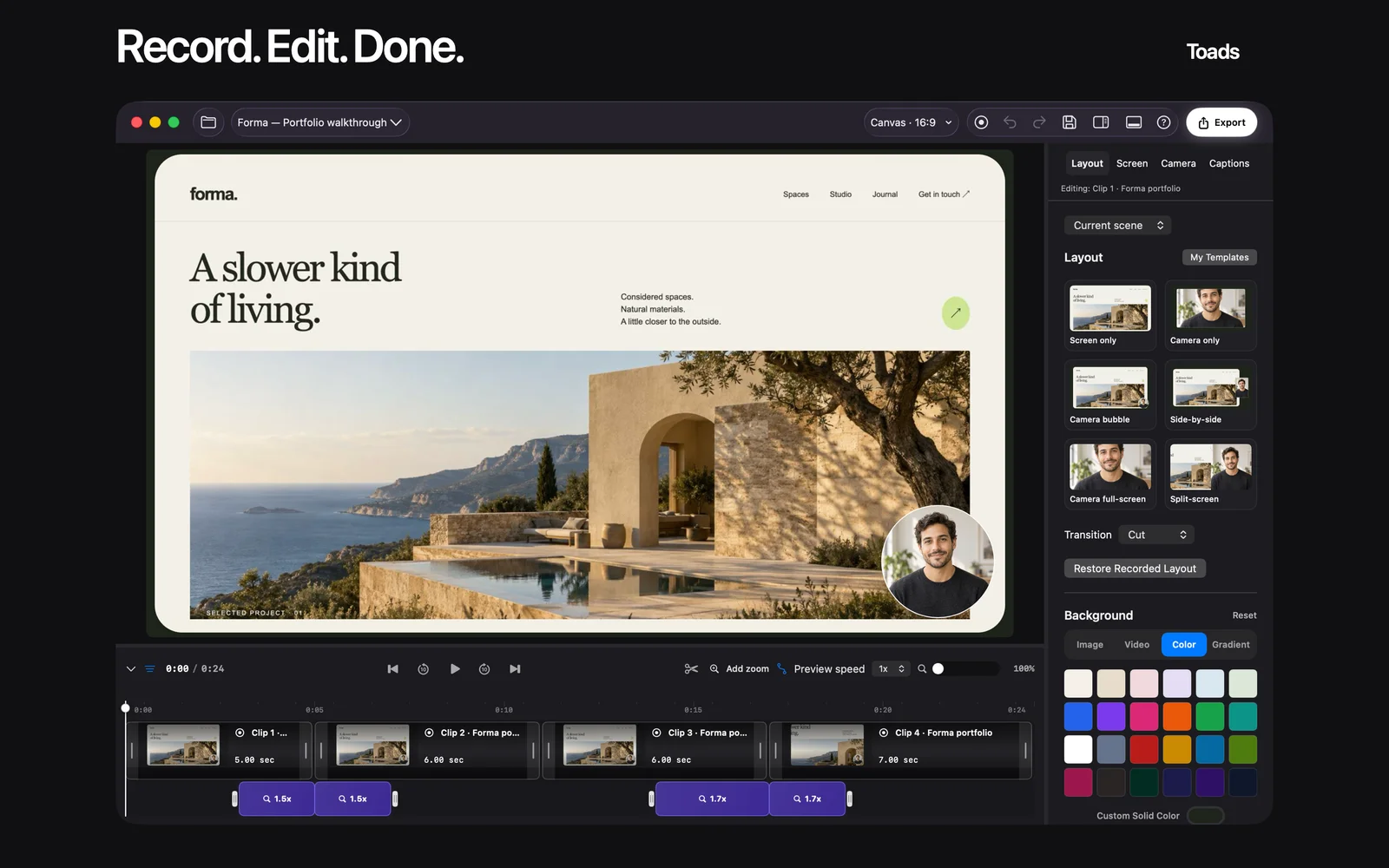
Toads is a native Mac screen recorder and editor. Its public site describes display, window, or region capture, a timeline, captions, transcript editing, and export. That is a practical combination for recording a task and then removing material that does not help explain it.
Set the capture area so interface text stays readable. Silence unrelated notifications and rehearse the task once. If you make an error, pause and restart the sentence or action so the edit point is clear. Avoid recording real customer records just because they happen to be open.
The website currently lists a seven-day trial followed by a $99 one-time purchase. Check the current system and license terms before adopting it for your workflow. The public MCP guide also describes agent-assisted editing; use the current supported setup and inspect the resulting timeline before exporting.
Step 3: Retrieve the evidence images in Screen Index
Screen Index can search visible screenshot text and file names in its free version. It keeps originals in the Finder folder you choose, which helps when a demo needs an image saved earlier in the project. Find the screenshot using a distinctive phrase and check its source date and plan.
Keep three kinds of images: the starting condition, a detail the video moves past, and the final result. You do not need all three on every page. Include an image only when it answers a question that the prose or video leaves open.
The app requires macOS 26 or later. Lifetime adds features including Global Recall, Quick File, and richer search; some capabilities depend on hardware and system support. The stated 14-day Lifetime trial starts after the first new screenshot is successfully processed.
Build the two-part workflow: Check Toads’ current editing tools and Screen Index’s screenshot search, then try one short demo with your own material.
Step 4: Edit for a buyer’s question
Start with the outcome and then show how it happens. Cut repeated setup, long pauses, and typing that adds no useful context. Keep a necessary approval, plan restriction, or manual step visible so the sequence remains honest.
Check captions against the narration, particularly product names and technical labels. Watch the export with headphones and again with the sound off. The reader should still understand the main action from captions, labels, and the article’s text.
| Content element | Best use | Final check |
|---|---|---|
| Short video | Sequence and interaction | The task remains understandable after cuts |
| Screenshot | A detail or result worth inspecting | Current, readable, and safe to publish |
| HTML table | Compare conditions or choices | Text is readable without an image |
| Product link | A useful next action | Destination and disclosure are clear |
Step 5: Publish and review the page
Place the disclosure near the first recommendation. Give the video a descriptive title and add a short text explanation so the answer does not depend on playback. Use descriptive image alt text and keep the key comparison facts in ordinary page text.
Add contextual CTAs near the beginning, middle, and end. Each should explain the next action rather than repeat a vague “click here.” Check the published page at a narrow width, test the links, and verify that a reader can inspect the images without losing their place.
What useful results look like
The first useful result is a demo that lets another person complete or evaluate the task without asking you to explain missing steps. Record the questions they still have and improve the resource. Review outbound clicks or assisted sales only when your analytics can actually support those measures.
This guide provides a workflow, not a case study claiming higher conversion. Do not label an example as a customer result unless you have evidence and permission to publish it.
FAQ
How long should an affiliate product demo be?
Use the shortest length that explains the task, result, and relevant limitations. Cut repetition before removing a step that a buyer needs to understand.
What should I show before the main action?
State the account or plan, starting file, and any required setup. A viewer needs those conditions to judge whether the workflow applies to them.
How do Toads and Screen Index work together?
Use Toads for recording and editing the sequence, then Screen Index to retrieve and prepare supporting screenshots. They remain separate apps rather than a claimed automatic integration.
What can MCP do in this workflow?
Toads advertises agent-assisted editing through MCP. Check the current setup guide and review the changes in the timeline before using the export.
How do I keep private information out of the demo?
Use demonstration material and close unrelated content before capture. Inspect the final video and each exported image before publishing.
What should I update after a product changes?
Recheck the demonstrated steps, plan requirements, screenshots, and linked terms. State what you actually reviewed rather than implying a new hands-on test you did not perform.
Make one demo readers can use
Choose a buying question you can answer clearly. Prepare the starting conditions and capture one task. Add only the screenshots that improve understanding. Review the final export and page together. Keep the originals and source notes so you can maintain the resource later.
Start the workflow: Visit Toads and visit Screen Index for current downloads, requirements, and plan details.
Sources and disclosure
Reviewed October 23, 2026: Toads, Toads MCP guide, and Screen Index. The proposed workflow does not imply an automatic integration between the apps or a measured sales result.